This morning, before 6 AM, my AI assistant opened Google Keyword Planner in my browser and pulled 164 keyword ideas for this exact post. I picked the topic from 3 options. Then I made coffee.
That is what the right AI tools for entrepreneurs feel like. Not a shiny app you open once. A quiet team that works while you take care of everything else.
So here is my short answer: the best AI tools for entrepreneurs are 1 or 2 AI assistants (I use Claude and ChatGPT) plus the everyday tools they plug into, like your project board, your team chat and your website. You do not need 50 apps. You need a small stack that talks to each other.
I run 3 companies with AI: VIXA, my dating clarity app, Havenly, my Gen Z beauty brand, and LUMAPROMPT.AI, my prompt library for women. Below are the 9 tools I actually use, what each one does for me, and how to build your own stack without wasting money.
Why most AI tool lists do not help you
Search "AI tools for entrepreneurs" and you get lists of 30, 50, even 100 apps. Most are written by software review sites. Many of the writers have never run a business with the tools they list.
Here is a surprising number. In a 2026 survey of more than 1,200 small business owners, 76% said they already use AI, but only 14% have fully built it into how their business runs. Almost half said that picking the right AI tools is hard.
So the problem is not access. Everyone has access. The problem is choosing a few tools and actually wiring them into your day. That is what this post is about.
My AI stack in 3 layers
I think about my tools in 3 layers. Once you see it this way, every new app becomes an easy yes or no.
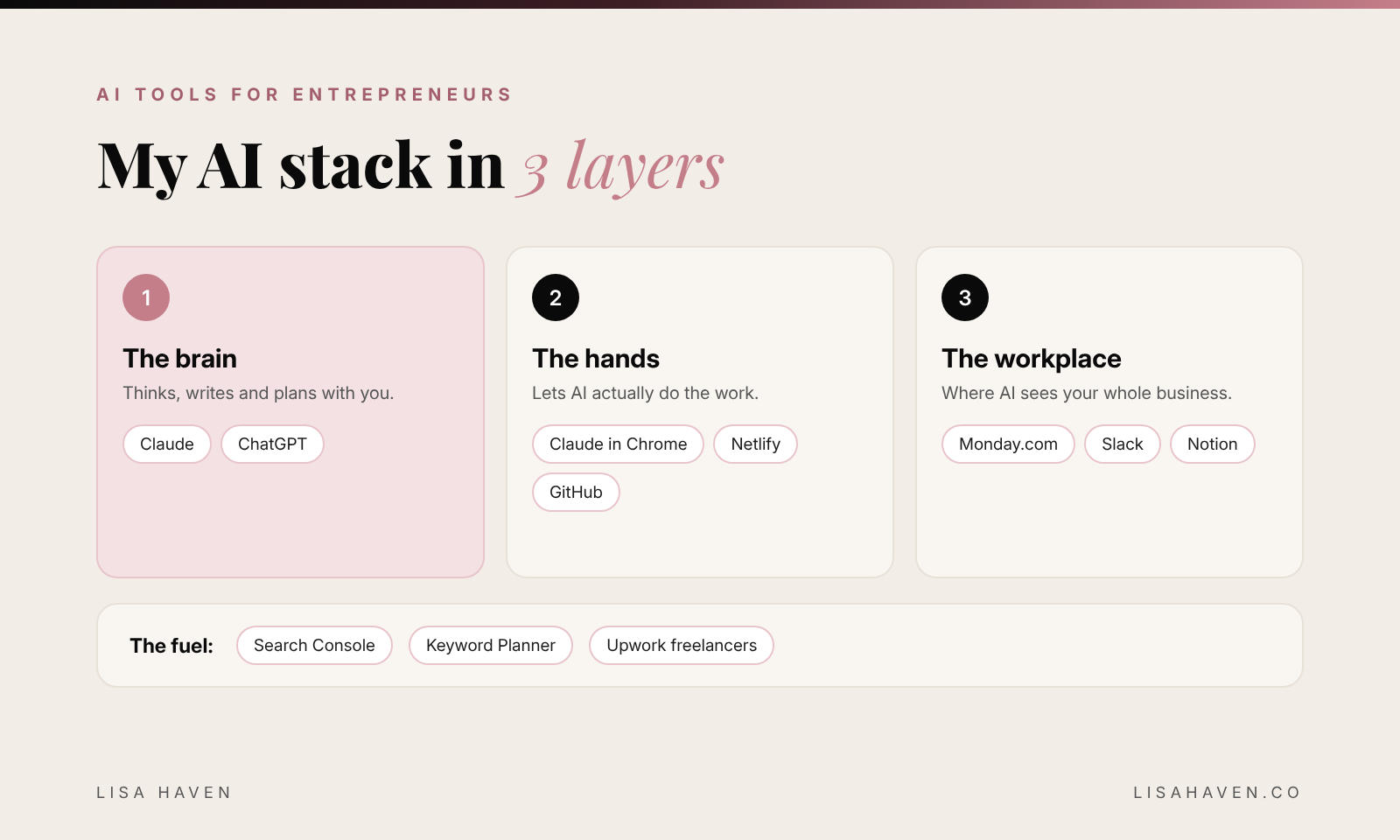
- The brain. The AI assistant that thinks, writes and plans with you.
- The hands. Tools that let AI actually do things, like work a website or publish a page.
- The workplace. Where your tasks, team and notes live, so AI can see the whole business.
Most people stop at layer 1. They chat with AI, copy the answer, and paste it somewhere else. The real time savings start when you connect layers 2 and 3.
The brain: my 2 AI assistants
1. Claude
Claude is my daily business partner. I use it to write, plan, research, build websites and run my morning routine. On Easter Sunday I sat with Claude for 13 hours and built the technical foundation of VIXA with no coding background.
What makes it powerful for founders is that Claude can connect to the tools you already use. Mine is connected to my project board, my team chat and my notes, so I can ask "what did my creator managers finish yesterday?" and get a real answer.
2. ChatGPT
ChatGPT is my second brain for images, voice brainstorming and quick questions on the go. I compared both in detail in Claude vs ChatGPT for business, if you are deciding which one to pay for first. Both paid plans start at $20 a month.
My rule: start with 1 AI assistant. Learn it deeply for 30 days before you add a second one.
The hands: tools that let AI do the work
3. Claude in Chrome
This is the one most founders have never tried. Claude in Chrome is a browser extension that lets Claude work inside websites for you: click, read, fill in forms and pull data. It is how my keyword research happened this morning. It is also how my Pinterest pins get uploaded with every title, description and board filled in.
You stay in control. It asks before it does anything big, like sending or buying.
4. Netlify and GitHub
My websites, including this blog and vixaapp.ai, live on Netlify, with the files stored on GitHub. Why does that matter for AI? Because Claude can write a page, save it to GitHub, and Netlify puts it live in about 1 minute. This blog runs on that exact setup. I write every post myself, and I use AI to edit, fact check and publish it.
You do not need to understand code to use this. You need to understand what you want the page to say.
The workplace: where AI sees your business
5. Monday.com
Monday.com is where my projects and hiring live as boards. Every task has an owner, a status and a date. When AI can read your boards, it can tell you what is late, what is stuck and what to do next.
6. Slack
Slack is where I talk to my team, including my creator managers for VIXA. Claude can read a channel, summarize what happened and send a message for me. I wrote more about that system in how to manage UGC creators with AI.
7. Notion
Notion is the home for my VIXA content system: ideas, scripts and what got posted. 1 clean place for notes means AI does not have to guess where things are.
The fuel: free data and real people
8. Google Search Console and Keyword Planner
AI is only as smart as what you feed it. Google Search Console shows which searches already bring people to your site. Google Keyword Planner shows what people search and how much competition there is. Both are free. Keyword Planner just needs a Google Ads account, and you do not have to run any ads.
This post exists because Keyword Planner showed "AI tools for entrepreneurs" gets real searches with low competition. Data first. Opinion second.
9. Upwork
AI does not replace people. It makes a small team mighty. I hire freelancers on Upwork who know how to work alongside AI. 1 smart freelancer with Claude can do what used to take a whole department.
What it costs: my 9 tools side by side
Some links in this post may be affiliate links, which means I may earn a small commission at no extra cost to you. I only share tools I really use.
| Tool | What I use it for | Free to start? | |---|---|---| | Claude | Writing, planning, building | Yes. Pro is $20 a month | | ChatGPT | Images, voice, quick answers | Yes. Plus is $20 a month | | Claude in Chrome | AI that works websites | Needs a paid Claude plan | | Netlify and GitHub | Websites that go live fast | Yes | | Monday.com | Projects and hiring boards | Yes, for up to 2 people | | Slack | Team chat | Yes | | Notion | Notes and content system | Yes | | Search Console and Keyword Planner | What people search | Yes | | Upwork | Hiring freelancers | Free to post a job |
You can start almost this whole stack for the price of 1 dinner out. Plans and prices change, so check each site before you sign up.
How to build your own AI stack in 5 steps
- Pick 1 brain. Claude or ChatGPT. Use it every day for 30 days.
- Write down your top 5 time wasters. Email, posting, reports, research, scheduling. Be honest.
- Find where each one lives. Your inbox, your board, your website. That tells you which tool to connect next.
- Connect 1 tool at a time. Start with your project board or team chat, so AI can see your work.
- Give AI 1 recurring job. A morning brief is the perfect first job. Here is how I built mine: how to create an AI agent with Claude to run your business.
Here is a prompt to help you choose your first connection:
I run a small business. Here is what I do every week: [list your top 5 tasks and how long each takes].
Here are the apps I already use: [list them].
1. Tell me which 2 tasks AI could help with first and why.
2. Tell me which of my apps to connect to my AI assistant first.
3. Give me a simple 7 day plan to test it.
Keep it short and practical. Do not suggest new apps unless I truly need them.
The 3 mistakes I see founders make with AI tools
Buying too many tools. 10 subscriptions you barely use cost more than 1 assistant you use well.
Never connecting anything. Copy and paste is not a system. The magic is when AI can see your real work.
Letting AI send without a human check. AI drafts. You decide. I never let AI promise money, sign anything or speak for me in a sensitive moment without reading it first.
Your next step
Do not try to build my whole stack this week. Pick 1 brain, give it 1 job, and connect 1 tool. That alone puts you ahead of most business owners.
Want better answers from whichever AI you choose? LUMAPROMPT.AI is my library of prompts written by real human experts, made for women in business.
FAQ
What is the best AI tool for entrepreneurs? An AI assistant like Claude or ChatGPT is the best place to start, because it helps with almost every task. Pick the one that fits the work you do most, then connect it to the tools you already use.
Are AI tools for entrepreneurs expensive? No. Most tools in my stack have a free plan, and the main paid AI plans start at about $20 a month. Start small and only pay for what you use every week.
Do I need to know how to code to use AI tools? No. I built my app and my websites with AI and no coding background. You need to explain clearly what you want, and check the result.
Before you go
Which AI tool could you not live without? Tell me in the comments. I read every single one.
"You do not need more hours. You need fewer things standing between you and the work that matters."