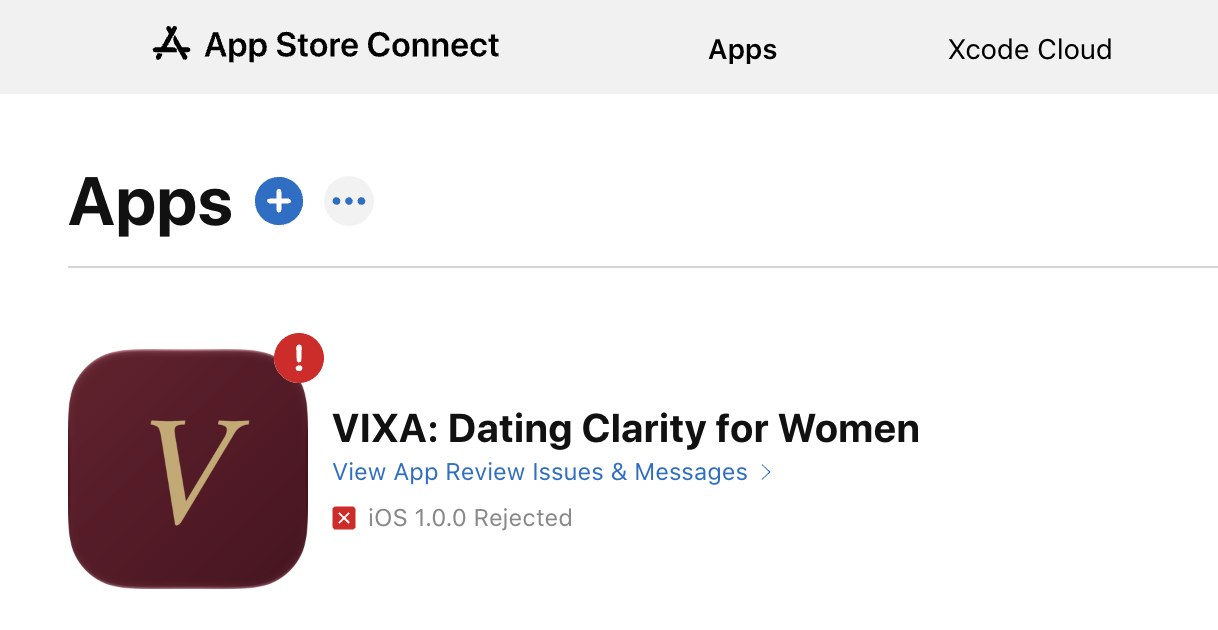
I opened App Store Connect and saw a small red X next to my app's name.
VIXA: Dating Clarity for Women. iOS 1.0.0 Rejected. (iOS is the software that runs every iPhone.)
!Screenshot of App Store Connect showing the VIXA app with an iOS 1.0.0 Rejected status
I have about 30 creators in my Discord group, ready to advertise VIXA the day it goes live. And Apple just said: not yet.
I'm not going to pretend that didn't sting. It's disappointing. But here is what I know about what to do when Apple rejects your app: you read the message, you fix the exact issue Apple names, and you resubmit. Most rejections are fixable, and Apple says it reviews 90% of submissions in under 48 hours.
So today I'm sharing my real playbook, written while I'm in the middle of it.
Disappointed? Yes. Defeated? No.
Getting rejected is part of building something new. My job as a founder is not to avoid problems. My job is to fix them, stay hopeful and be ready for the next one, because there will always be a next one.
I'm not afraid of failure. I'm failing forward. Every "no" makes me stronger and pushes me to the next level.
It's the same thing I see in the gym. Muscle doesn't grow when the weight is easy. It grows when the weight pushes back and you keep showing up anyway. This rejection is weight. I'm lifting it.
Is it normal for Apple to reject your app?
Yes. Very normal.
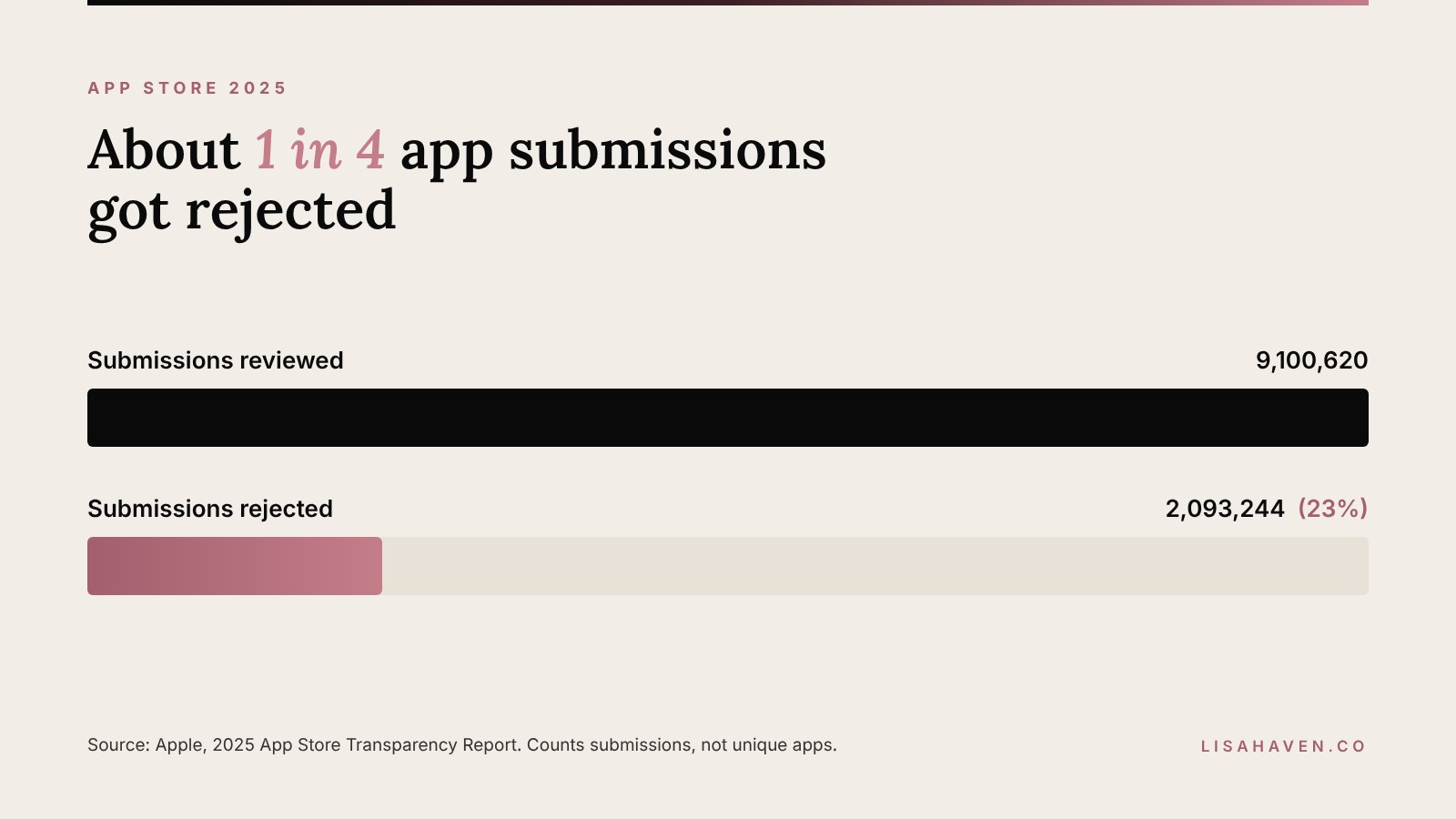
In its 2025 App Store Transparency Report, Apple says it reviewed 9,100,620 app submissions and rejected 2,093,244 of them. That's about 23%, or roughly 1 in 4.
Big companies get rejected. Funded startups get rejected. Founders with full engineering teams get rejected.
Here's the part most people never hear. On its App Review page, Apple says over 40% of unresolved issues come from 1 rule: guideline 2.1, called App Completeness. In plain words, Apple wants a finished app. No crashes, no dead buttons, no "coming soon" screens, and a way for the reviewer to log in and test everything.
That means many rejections come down to details. And details can be fixed.
What to do when Apple rejects your app: 5 steps
1. Read the full message before you react
Open App Store Connect (Apple's website where you manage your app) and go to the App Review section. Apple's message will name the guideline your app broke, usually as a number like 2.1 or 5.1.1.
Read it twice. Send it to your developer. Don't guess what Apple meant. Work from what they actually wrote.
2. Look up the exact guideline
Every guideline number links back to Apple's App Review Guidelines. Read that whole section, not just the line in your message.
This is where AI saves me hours. I paste the rejection message and the guideline into Claude and ask: "Explain this in plain English, and give me a checklist of everything in my app that could trigger it." In 2 minutes I have a clear fix list instead of a headache.
3. Fix the exact issue, then check the usual suspects
Fix what Apple named first. Then scan your app for the other common problems, so you don't get sent back for something new. Apple lists the issues it sees most often, and here they are in plain English:
Crashes and bugs. Test every screen on a real iPhone before you submit.
Broken links. Tap every link, including your support and privacy links.
Placeholder content. Replace any test text or empty screens with the real thing.
Incomplete information. Give Apple a working demo account and clear notes. A reviewer who can't get in can't approve you.
Privacy policy issues. Link your privacy policy inside the app and on your App Store listing.
Unclear permission requests. If your app asks for photos, contacts or the camera, say clearly why.
Inaccurate screenshots. Your store images have to match the real app.
4. Reply or appeal if Apple got it wrong
Sometimes the reviewer simply missed something. You can reply to App Review right inside App Store Connect and explain.
If you truly believe your app follows the rules, you can appeal to the App Review Board. Apple allows 1 appeal per submission, and you need to give specific reasons. Stay calm, clear and factual.
5. Resubmit and update your team
Once the fix is in, resubmit. Then give your team a realistic new timeline.
What not to do after a rejection
A rejection is a moment where small mistakes can cost you weeks. Avoid these:
Don't resubmit the same build and hope for a different reviewer. If nothing changed, the answer won't change either.
Don't argue in your reply. Reviewers are people. Clear and kind gets you further than frustrated and defensive.
Don't rush 10 changes at once without testing. Fixing 1 problem and creating 2 new ones is the fastest way to a second rejection.
Don't go silent. Your team, your creators and your early users can handle a delay. What they can't handle is not knowing.
1 thing you cannot skip
Give Apple a working demo account every single time you submit, with a short note that walks the reviewer through your main feature.
It sounds small. It isn't. If the reviewer can't log in, they can't see what your app does, and the answer will be no before they ever reach the good part. Test the login yourself the morning you submit.
How I keep 30 creators ready while we wait
Keeping them close
This is the part nobody teaches you. A rejection delays your app, and it also tests your team.
My creators signed up because they believe in VIXA, and I take that seriously. Here's how I keep them close:
Tell them first. They should never learn about a delay from a public post. A short, honest message: what happened, what we're doing and when they'll hear from me next.
Give them a job. Waiting feels long when there's nothing to do. Their accounts keep warming up, and they keep practicing their hooks so they're ready on day 1.
Show the process. "We got rejected, here's what we're fixing" is a real story. Real stories build trust.
Keep your word on updates. If I said Friday, I update them Friday, even if the news is "still in review."
Running it with AI
This is the part people ask me about the most.
I don't run my creator group alone, and I don't run it with a big team either. I run it with AI and 2 creator managers: 1 for influencers and 1 for UGC creators. (UGC means user generated content: real people making videos about your product.)
My managers bring the warmth and the human touch. AI brings the speed. It answers the same questions creators ask over and over, sends reminders, keeps 1 live list of every creator and what she still has to do, and turns my voice notes into short guides.
I don't write code. I just tell it what I need in plain words, like:
- "Answer the new creator messages."
- "Let the creators know the launch date moved, and what to work on this week."
- "Show me a list of who still needs to send her account link."
These are the tools I use to run it:
Disclosure: some links below may be affiliate links, which means I may earn a small commission at no extra cost to you. I only share tools I actually use.
- Claude handles the messages, reminders, guides and tracking.
- Monday.com holds every task, with an owner and a due date, so nothing slips.
- Slack is where my team and I talk through fixes fast.
So even on a day like today, the program doesn't stop. My creators still get answers, and I get to focus on fixing the app.
I'm writing up exactly how I do it, step by step, in an upcoming post, because this is what I want every woman to know: you can leverage AI to run your businesses and take hours off your plate. In the meantime, you can read how I built my UGC creator program before launch and how to create an AI agent with Claude.
Why I'm sharing this out loud
I could have kept this quiet, fixed it and posted only the win. But that's not why I started this blog.
The same week VIXA got rejected, I read an interview with Christina Qi, the CEO and co-founder of Databento, in Entrepreneur. She grew up on food stamps, started a hedge fund as a student at the Massachusetts Institute of Technology (MIT), and now runs a company that counts Nvidia and OpenAI as clients. Her point hit me hard: getting rejected is part of the founder job description. If you're getting told no, you're doing the job.
As a mother of 3 running 3 companies, I also know my daughters are watching how I handle hard days. I want them to see what a founder does after a no: she fixes it and moves forward.
That's why I believe in building in public before revenue. The wins, the mess and everything in between. If you only ever see the highlight reel, you start to think your own setbacks mean something is wrong with you. They don't.
Frequently asked questions
How long does Apple take to review an app? Apple says it reviews at least 50% of submissions in under 24 hours and 90% in under 48 hours. A resubmission goes through the same review.
Can I appeal an App Store rejection? Yes. If you believe your app follows the guidelines, you can appeal to the App Review Board. Apple allows 1 appeal per submission, and you need to give specific reasons.
What is the most common reason apps get rejected? App Completeness, guideline 2.1. Apple says it causes over 40% of unresolved issues. Crashes, broken links, placeholder content and missing demo logins all fall under it.
Your next step
If you're a founder sitting with your own rejection right now, close this tab and do step 1. Read the message. Make the list. Fix it.
VIXA is coming. When it lands on the App Store, it will help you read the texts, the timing and the mixed signals with clarity instead of group chat guesswork. Get on the early access list at www.vixaapp.ai.
I'll share the moment we get approved right here. Follow along on Instagram and TikTok at @vixaapp.ai and on LinkedIn.
Tell me in the comments: what's 1 rejection that made you stronger?
Lisa Haven
"Put yourself out there, embarrass yourself on stage and get rejected."
~ Christina Qi