I run 3 companies, and I do not have a marketing team or a big budget for ads. So I want my blog to bring in readers for free, every day, even while I am at the gym or picking up my girls. That means Google.
So here is how to use AI to write blog posts that rank on Google, in short: pick 1 phrase real people type into Google, answer it in the first 2 sentences, add what only you know, and use AI as your researcher and editor, not your ghostwriter. Google does not punish AI. It punishes posts that do not help anyone.
This week I rebuilt the way I write every post on this blog around that idea. I do not pay for Google Keyword Planner or any expensive SEO tool. Everything below is free. Here is my exact system.
Does Google penalize AI written content?
No, not for being AI written. Google said it plainly in its guidance on AI generated content: its systems reward helpful, high quality content, however it is produced. Using AI is not against its rules.
What Google does go after is content made mainly to game rankings. Think 100 thin posts pumped out in a day with nothing new in them. That is spam, whether a person or a robot wrote it.
Google's own guide to helpful, people first content asks you to think about 3 questions: Who made this, How was it made, and Why was it made. The best answer to "why" is always "to help a real person," not "to rank."
It also asks if your content shows first hand experience. That is your secret weapon. AI has read the internet. It has not lived your life.
Why most AI blog posts never get traffic
Most people open ChatGPT, type "write a blog post about productivity," and hit publish. Here is why that post goes nowhere:
- Nobody searches for that. "Productivity" is a topic, not a question. People type full questions, like "how to stay focused when working from home with kids."
- It sounds like everyone else. AI gives the most average answer by design. Google already has thousands of average answers.
- The answer is buried. The reader has to scroll past 3 paragraphs of warm up to find what they came for. They leave.
- There is no proof. No story, no numbers, no "here is what happened when I tried it."
Fix those 4 things and you are ahead of most blogs on the internet.
How to use AI to write blog posts that rank in 6 steps
Step 1: Find what people actually type (for free)
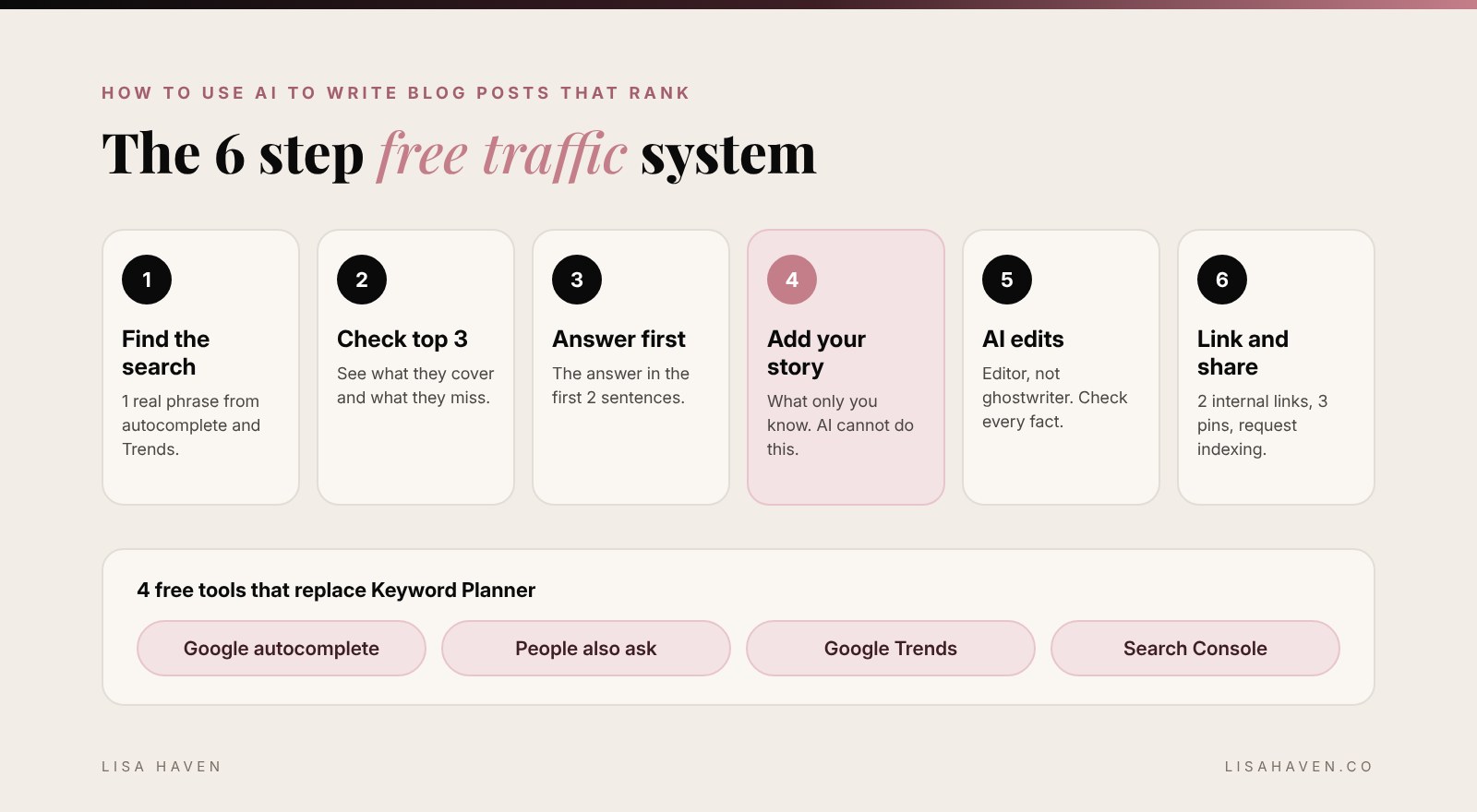
You do not need Keyword Planner. You need Google itself. Here are the 4 free places I look:
- Google autocomplete. Start typing your topic into Google and write down what it suggests. Those suggestions come from real searches.
- "People also ask." The box of questions in the middle of the results page. Each one is a ready made heading for your post.
- Google Trends. Type in 2 or 3 versions of your phrase and see which one more people search, and if it is growing.
- Google Search Console. Free from Google. Once your site is connected, it shows the exact phrases people typed before they found you. This is gold for your next post.
Then pick 1 phrase per post. Not a vague title like "My Journey." A real search, like "how to negotiate with a manufacturer as a solo founder."
AI can speed this up. Use this prompt to brainstorm, then check every idea in Google before you trust it:
I write a blog for [who your reader is] about [your topic].
Give me 20 questions my reader would type into Google, written exactly the way a real person types them.
Mix "how to," "what is," "why does" and "best way to" questions.
Then group them into 5 topics and mark the 3 that look most specific and easiest to answer well.
AI guesses. Google knows. So always test the phrase in autocomplete and Trends before you write.
Step 2: Look at what already ranks
Search your phrase and open the top 3 results. Ask yourself:
- What do they all cover? That is the minimum your post needs.
- What are they missing? That is your opening.
- Are they long guides, short answers, lists or videos? Match the format people want.
Most of the time, what is missing is a real person. A real example. A real mistake and what it taught you. That is where you win.
Step 3: Answer the question in the first 2 sentences
This is the rule I use in every post now. The reader gets the answer right away, in bold, at the top. Then the rest of the post explains how and why.
It feels backwards, like you are giving away the ending. But it is what keeps people reading, and it is the kind of clear answer that search results and AI answer tools like to show.
Then use the real questions from "People also ask" as your headings, word for word when they fit.
Step 4: Add what only you know
This is the step AI cannot do for you, and it is the step that ranks.
Before I write anything, I answer 3 questions in my notes app:
- What happened to me with this?
- What did I try that did not work?
- What would I tell my best friend to do?
Those answers become the heart of the post. A story from a real launch, a number from my own business, a screenshot, a lesson I paid for. That is the "experience" part Google looks for, and it is the part readers remember.
Step 5: Let AI be your editor, not your ghostwriter
I write the rough draft in my own words, messy and fast. Then I bring in AI to make it better. Here is the prompt I use:
You are my blog editor. Here is my draft post. The main search phrase is: [phrase].
1. Does the first paragraph answer the question in 2 sentences? If not, rewrite only that part.
2. List any questions a reader would still have after reading this.
3. Point out sentences that are too long or sound robotic. Suggest shorter versions in my voice.
4. Do not add facts, numbers or stories I did not give you.
5. Do not change my opinions.
Here is the draft: [paste draft]
That 4th line matters most. AI will happily make up a statistic that sounds real. Check every number and every fact against a real source before you publish. If you want my full method for keeping your voice, read how to use AI without sounding like AI.
Step 6: Link it, then share it
A post is not done when you hit publish. Before I call it finished:
- Link to 2 of your older posts that fit, and add a link from 2 older posts back to the new one. This helps Google find it and helps readers stay longer.
- Write a clear title and description with your search phrase in both. Keep the title under about 60 characters so it does not get cut off.
- Add alt text to every image that says what is actually in it.
- Make 3 Pinterest pins. Pinterest works like a search engine too, and pins keep sending readers for months.
- Ask Search Console to index it. Paste your new link into the inspection tool and request indexing.
How long does it take for a blog post to rank on Google?
Usually weeks to months, not days. A brand new site takes longer than a site Google already trusts. That is why the real secret is consistency. 1 helpful post a week for 6 months will beat 30 rushed posts in 1 month.
Check Search Console every week. When a post starts showing up for a phrase you did not plan for, write your next post about that phrase. Your readers are telling you what they want.
How many blog posts should I write a week?
As many as you can do well. For most founders, 1 to 2 a week is plenty. I would rather publish 1 post that truly answers a question than 5 that sort of do.
AI makes the research and editing faster, so you can keep a steady pace without burning out. It should save you time, not replace your thinking.
My free SEO toolkit
- ChatGPT or Claude: brainstorming questions, outlines and editing. I use Claude for most of my writing work.
- Google autocomplete and "People also ask": real questions, free.
- Google Trends: which phrase is bigger and growing.
- Google Search Console: what people typed to find you.
- A notes app: for your stories, wins and lessons. This is your real advantage.
If you want better answers from AI in general, start with how to ask ChatGPT better questions. Better questions really do get better results.
Start your first post today
Here is your homework. Open Google, type the start of a question your reader would ask, and pick 1 phrase from autocomplete. Write 3 sentences about what happened when you dealt with it yourself. That is your post. AI can help you shape the rest.
And if you want AI to handle more of the busy work in your business, read how to create an AI agent with Claude to run your business next.
FAQ
Can I use ChatGPT to write blog posts for SEO? Yes. Google rewards helpful content no matter how it is made. Use ChatGPT for research and editing, add your own experience, and check every fact before you publish.
Do I need to tell readers I used AI? Google suggests telling readers when they would reasonably expect to know how something was made. Many bloggers add a short note. If AI only helped you edit, most readers will not expect a note.
What is the best free keyword tool? Google itself. Autocomplete, "People also ask," Google Trends and Google Search Console are all free and use real search data.
Will AI content get my site penalized? Not for being AI written. Sites run into trouble when they publish lots of thin, copied or made up content to game rankings. Helpful posts with real experience are safe.
Before you go
What is the 1 question your readers keep asking you? Tell me in the comments. It might be your next post that ranks.